
Share:
- Information
- Related Templates
- Comments (0)
Avava Studio OS: an Admin Dashboard for Creative Teams
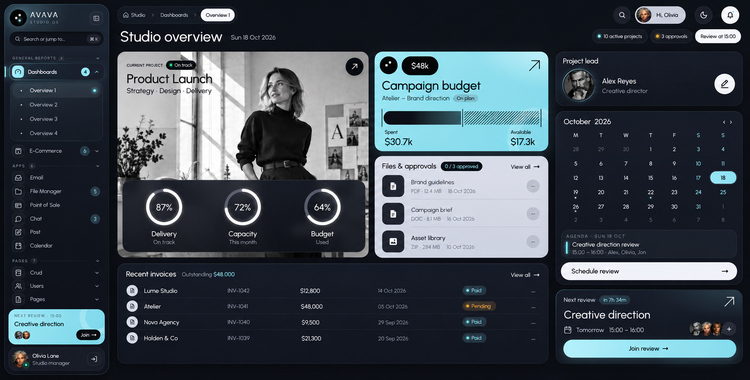
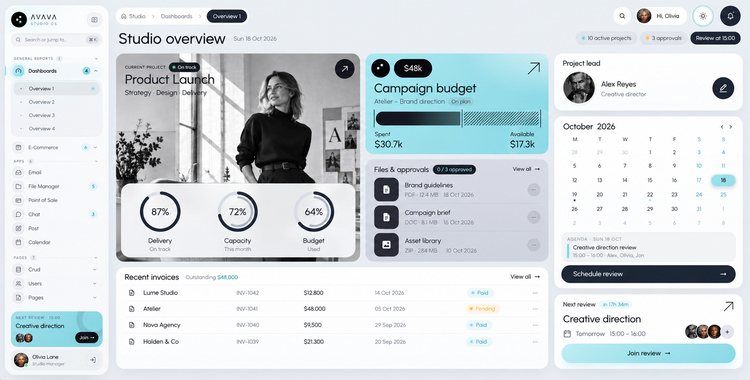
Avava Studio OS is an HTML admin template designed around the daily life of a creative business. Photo studios, design agencies, video producers and independent creatives juggle shoots, clients, budgets, files, approvals and invoices at the same time, and this template gives every one of those jobs its own screen. Inside you will find 132 ready pages with a dark interface as the default and a light interface one click away. The code is plain HTML, CSS and vanilla JavaScript, so there is nothing to install and nothing to compile. Unzip it, double-click index.html and start exploring.
What sets Avava Studio OS apart is that the demo is alive. Instead of flat mock-ups, each page reacts the way a finished product would: search narrows results, columns reorder, cards move between columns, wizards keep your answers, editors save drafts, and the register at the point of sale adds up a real basket. Calendar dates are calculated from the current day, so every visit looks fresh. You start your project with screens that already behave correctly and spend your time on your own data and features.
Dashboards that tell the studio's story
Four dashboards look at the business from different angles. The first one is the morning briefing: the active project, the campaign budget, files that need a decision, the latest invoices, who leads the work, what is on the calendar and the next client review. The second dashboard is about money and momentum, with profit, income compared to costs, the goal for the month, where clients come from, the sales funnel, the best clients, how busy the team is, incoming payments and results by region. The third dashboard puts clients on a world map and adds returning versus new clients, industries, a planner for calls in different time zones, satisfaction and retention. The fourth dashboard follows delivery: the production timeline, the pipeline, available capacity, logged hours, approvals waiting on clients, deadlines for the week and the margin of each project.
Six apps for everyday work
A shared inbox keeps client mail organised by folders and labels, shows the full conversation with attachments and the client's details, and lets you write from templates or schedule a message for later. Chat brings channels, private messages and client rooms together with file sharing, approvals, reactions, threads and pinned messages. The file manager tracks storage, groups files into collections and projects, handles bulk actions and keeps versions, permissions and activity for each file, with real uploads from your computer. The calendar switches between month, week and day, lets you drag events to a new time and warns about clashes. The point of sale runs a shop counter with product search, sizes, stock, loyalty discounts, promo codes and card, cash or split payments, plus held orders and refunds. The post planner lines up social content with drafts, a publishing calendar, client sign-off and previews for each channel.
Shop, people, billing and the rest of the site
The store section handles categories, a product editor, list and grid catalogues, payment history, sellers and customer reviews. People are covered by a user directory, detailed user views, profile pages with teams, projects and connections, and account settings for security, plans, billing and notifications. Billing continues with an invoice list, a print-ready invoice preview, an editor and a guided way to create a new invoice from tracked work or an estimate. Rounding out the site are a blog with an article page and a writing screen, pricing plans, a help centre, error and maintenance screens, a launch countdown, an access-denied page, six sign-in and account recovery screens, and wizards for checkout, listing a location and opening a deal.
Building blocks for your own screens
The component pages work like an interactive style guide. Each one starts with a playground where you can change options and see the result, then shows real use cases taken from the studio. The interface set covers cards in five families, accordions, alerts, badges, buttons, carousels, collapsible panels, dropdown menus, footers, list groups, dialogs, navigation bars, side panels, pagination, progress indicators, loaders, tabs, notifications, tooltips and type styles. The extended set adds avatars, loading overlays, sortable lists and boards, a video and audio player with chapters and captions, scroll areas, rating stars, confirmation alerts, dividers, two kinds of timelines, guided product tours, folder trees and more. For forms there are text fields, selects, check and radio controls, option cards, toggles, range sliders, date and time pickers, file uploads with progress, and editors for rich text, Markdown and code, all without third-party plugins, together with three form layouts, three step-by-step wizards and live validation.
Data on display
Tables range from a simple styled table to five interactive datatables: a searchable list, an advanced view with filters, grouped rows with totals, spreadsheet-style editing with undo, and a power table that exports data, prints it, hides, moves, resizes and pins columns, drags rows into a new order and scrolls smoothly through thousands of records. Charts are rendered as lightweight SVG by the template's own code and include line, area, bar, pie, donut, radar, combined and sparkline charts. A Leaflet map page shows clients as dots, pins or bubbles, groups nearby points, keeps the map and the client list in sync and lets you pick a location.
Details that matter
- A dark and a light theme that switch instantly and stay as chosen across pages
- A sidebar that collapses to icons, nests menus three levels deep and finds any page with Cmd / Ctrl + K
- Layouts tested from small 320 px phones up to wide 2560 px monitors
- Landmarks, keyboard control, clear focus states, a skip link and respect for reduced motion
- Markup and styles that pass the W3C validators, with a clean browser console
- Colour tokens in one place, so a new brand palette spreads to every page
- Three icon sets ready to use: Lucide line icons, Phosphor filled icons and Font Awesome Free
- Photos, portraits and video made especially for this template and included under its licence
- Clear documentation in English that walks through files, pages, themes, scripts and credits
Inside the package
You receive every one of the 132 pages, a single stylesheet with a table of contents, a readable JavaScript file for each interactive page, all images and the video, and the documentation. The pictures and the video were produced by the author with AI tools; you may use them in this template and in the website or application you build with it.
Please note: this is a front-end template. Server code, a database and user authentication are not included, so it can be paired with any back end or framework you prefer.
Page overview
Dashboards
- Studio overview, sales and performance, clients and geography, production and team
E-commerce
- Categories and add product
- Product list, product grid and project grid
- Transaction list and transaction detail
- Seller list, seller detail and reviews
Applications
- Email, file manager, point of sale, chat, post planner and calendar
Users and accounts
- Data list and data form
- User list with account, security, billing and plans, notifications and connections views
- Profile, teams, projects and connections
- Account settings for account, security, billing and plans, notifications and connections
- Update profile and change password
Content and site pages
- Blog list, blog article and write a post
- Pricing, FAQ, error, under maintenance, coming soon and not authorized
Invoices
- Invoice list, invoice preview, edit invoice and add invoice
Authentication
- Login, register, verify email, reset password, forgot password and two-step verification
Wizards and dialogs
- Checkout, property listing, create deal and modal examples
Cards
- Basic, advanced, statistics, analytics and actions
User interface
- Accordion, alerts, badges, buttons, carousel, collapse, dropdowns, footer, list groups, modals, navbar, offcanvas, pagination and breadcrumbs, progress, spinners, tabs and pills, toasts, tooltips and popovers, typography
Extended UI
- Avatar, BlockUI, drag and drop, media player, perfect scrollbar, star ratings, SweetAlert2, text divider, basic timeline, fullscreen timeline, tour, treeview and miscellaneous
Icons
- Line icons, filled icons and Font Awesome
Forms
- Inputs, selects, checkboxes and radios, custom options, editors, switches, extras, date pickers, sliders and file upload
- Vertical, horizontal and sticky actions layouts
- Numbered, icons and vertical wizards
- Form validation
Tables
- Tables and datatables: basic, advanced, row grouping, editable and extensions
Charts and maps
- Line and area, bar, pie and donut, radar, mixed, sparklines and Leaflet maps


 Theme Author:
Gridgum
Author since September 2016

| Date of Creation: | 18 October 2026 |
| Last Update: | Never |
| Compatible Browsers: | IE, Chrome, Safari, Firefox, Opera |
| Files included: | HTML, CSS, JS, Files, Images |
| Documentation: | Well Documented |
| Layout: | Responsive |
| Tags: | admin dashboard, admin template, html template, dashboard, dark mode, crm, agency, project management, ecommerce admin, invoice, datatables, charts |
| Type: | Admin & Dashboard |
| Categories: | MultiPurpose Themes |
| item #: | 31154 |
All Rights Reserved Gridgum


Comments
No comments yet.