
-
Exclusive
Share:
- Information
- Related Templates
- Comments (13)
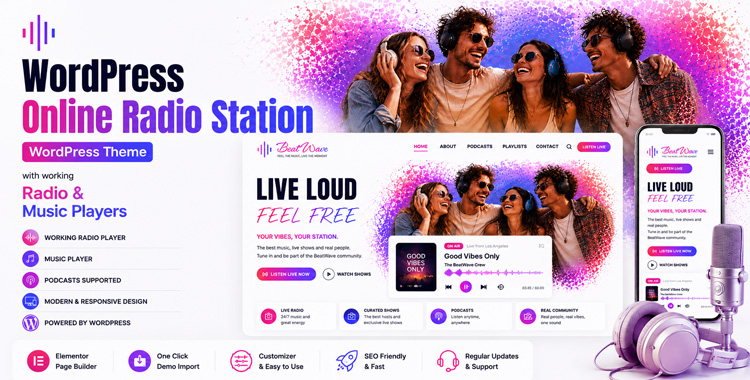
Radio BeatWave: The Ultimate WordPress Radio Template for Modern Broadcasters and DJs
Introduction
Are you looking to launch a powerful, engaging, and highly professional Online Radio Station? Meet Radio BeatWave, the most advanced, visually stunning, and feature-rich WordPress Radio Template designed specifically for modern broadcasters, podcasters, DJs, music artists, and entertainment networks. In today's digital age, having a captivating web presence is just as important as the quality of your audio. Whether your goal is to stream live daily shows, host a massive archive of podcasts, or curate custom music tracks for your audience, this template brings your audio content to life like never before. With its premium design and cutting-edge technology, Radio BeatWave is the definitive solution for anyone looking to dominate the WordPress Online Radio space.
The Heart of the Theme: A Revolutionary Dual Audio Player
One of the most impressive and technically superior features of Radio BeatWave is its highly sophisticated, custom-built continuous audio player. Unlike many standard WP Radio Themes that only offer basic streaming capabilities, BeatWave boasts an innovative dual-mode audio engine. It functions flawlessly as both a robust live streaming radio player and a fully interactive music playlist player.
Your listeners can seamlessly switch between tuning into your live WordPress Radio broadcast and exploring your curated featured tracks, albums, and top hits. But the magic doesn't stop there. Thanks to our advanced PJAX (seamless AJAX page loading) integration, the music literally never stops. Users can navigate through every single page of your website—reading your latest blog posts, checking out the host profiles, browsing upcoming schedules, or using the contact form—while the sticky bottom audio player continues to play completely uninterrupted. Combined with a stunning, real-time CSS/JS audio visualizer that reacts dynamically to the vibe, your audience will experience a visually and aurally immersive journey that keeps them on your site much longer.
Comprehensive Content Management System
When it comes to managing a successful Online Radio Station, you need more than just a beautiful frontend; you need a powerful, intuitive backend. Radio BeatWave is engineered with a robust architecture utilizing custom WordPress Post Types and seamless Advanced Custom Fields (ACF) integration. You are granted complete, dynamic control over every aspect of your station:
- Radio Stations: Add and manage multiple live stream URLs effortlessly, accommodating various genres or regional broadcasts.
- Music Tracks & Playlists: Upload custom album art, define artists, categorize by genres, and curate engaging playlists that your users can interact with directly.
- Shows & Podcasts: Schedule your daily or weekly programming so your listeners always know when their favorite host goes live.
- Hosts & DJs: Give your talented team the spotlight they deserve with beautifully designed, dedicated profile sections.
Every visual element, text block, and audio source you see on the screen can be managed directly from the familiar WordPress dashboard. This makes it incredibly easy for station managers, regardless of technical skill, to keep content fresh and exciting without ever touching a single line of code.
Design, Responsiveness, and Deep Customization
Radio BeatWave sets an entirely new aesthetic standard for what a WordPress Radio Template should look like. It features a premium, modern design characterized by vibrant gradient accents, sleek aesthetics, glassmorphism UI elements, and smooth micro-animations that make the interface feel alive. Because we know your audience is constantly on the move, the theme is 100% fully responsive. It looks and functions flawlessly on high-resolution desktops, tablets, and all mobile devices, ensuring your listeners have the absolute best experience on the go.
Furthermore, via the native WordPress Customizer, you can easily tweak site logos, brand taglines, hero background images, and more to perfectly match your station's unique brand identity.
Why Choose Radio BeatWave Over Other WP Radio Themes?
If you want to build a highly successful and profitable broadcasting platform, you need the right digital tools. Among the vast sea of WP Radio Themes, BeatWave stands head and shoulders above the rest due to its flawless performance, zero page-reload interruptions, and unparalleled audio versatility. With built-in, beautifully styled Contact Form 7 support, SEO-friendly clean code structure, and a translation-ready architecture, this WordPress Online Radio theme provides absolutely everything you need right out of the box. It is not just a theme; it is a complete broadcasting platform. Start sharing your vibe, connecting with your community, and broadcasting your unique sound to the entire world today with Radio BeatWave!


 Theme Author:
Gridgum
Author since September 2016

| Date of Creation: | 6 May 2026 |
| Last Update: | Never |
| Compatible Browsers: | IE, Chrome, Safari, Firefox, Opera |
| Files included: | JS, Files, Images |
| Documentation: | Well Documented |
| Layout: | Responsive |
| Tags: | WordPress radio station, radio station WordPress theme, wordpress radio theme, radio templates |
| Type: | WordPress Themes |
| Categories: | Music Themes, Radio Themes |
| item #: | 31135 |
All Rights Reserved Gridgum


Comments
Hi, I need to translate the pages, playlist, contact, the slugs, etc...can I?
Yes, I think you can
Okay, but the player I'm talking about is like the one in the image that's in the link. https://prnt.sc/Y-ApFtzRWeCZ
Ah, I just understood which player you're referring to.
That is not the radio player included with the theme. It is our Radio Tuner, Player & Equalizer WordPress Plugin, which is a separate premium product that we developed and sell independently.
The theme you purchased does not include this plugin, which is why it does not appear on your website.
If you would like to have the same Radio Tuner shown in the demo, we can provide and install it for you. The plugin costs an additional $43, and after purchase we will install and configure it on your WordPress website.
With this plugin, your visitors will have access to over 98,000 online radio stations from around the world, allowing them to search and listen to thousands of stations directly on your website.
This is a unique product that we developed ourselves, and it offers functionality that is not available in standard WordPress radio themes or plugins.
email sent with credentials.Tanks
Dear Customer,
We have reviewed your website and the theme itself is working correctly.
It seems that the theme documentation was not fully followed during the setup. The website needs to be configured properly after installation. For example, if radio stations are not added in the settings, the player will not have any stations to play.
Regarding the radio player, we tested it by adding two radio stations, and the player works correctly.
We also noticed that the Homepage and Blog page were not assigned in the WordPress Reading Settings. We have now configured these settings, and the website is working correctly.
Regarding the missing SVG files shown in the console, these are minor missing image references and do not affect the main functionality of the theme.
Please carefully review the documentation and follow the setup instructions step by step.
Kind regards,
I will send it using my personal email address.
ok
admin access send to email support@gridgum.com Tanks
Didn't receive, also please send to gridgum@gmail.com, maybe something is wrong with our mailbox
Okay, why doesn't my theme appear the same as in the demo? For example, the player doesn't even appear when scrolling, and I get an error in the console: "Failed to load resource: the server responded with a status of 404 (Not Found) vertdivider-2.svg:1 Failed to load resource: the server responded with a status of 404 (Not Found) vertdivider-3.svg:1 Failed to load resource: the server responded with a status of 404 (Not Found)." Any help?
Hello,
Yes, of course! We would be more than happy to help you get this sorted out.
To find out why the player isn't showing up and to fix the missing files (404 errors), we need to take a look at your setup. Could you please provide us with temporary admin access? We will need:
The URL where the theme is installed
Admin username
Admin password
Also, we highly recommend taking a quick look at the theme documentation. It provides detailed, step-by-step instructions on how to configure everything to match the demo perfectly.
Looking forward to your reply so we can fix this for you!
For security reasons, please send information to support@gridgum.com
Best regards,
George